WordPress plugin
Side Menu Pro: Sticky Navigation and Display Rules
Side Menu Pro creates sticky floating side menus on the left or right edge of a WordPress site. Visitors can reach selected links and actions as they move through a page, including contact settings, offers, calculators, popups, and modals.
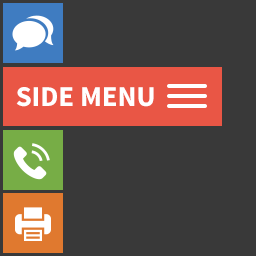
Side Menu Pro creates sticky floating side menus on the left or right edge of a WordPress site. Visitors can reach selected links and actions as they move through a page, including contact settings, offers, calculators, popups, and modals.
Build a menu around its purpose: group navigation links, offer account shortcuts, or put page-specific actions within reach. Menus can also be configured for different devices, languages, roles, and browsing conditions.
Organize destinations and actions
Submenus group related destinations, while extended labels add context. The hold-label option keeps labels open, and built-in search helps visitors find entries in larger menus. Choose custom icons such as emojis, letters, uploaded images, or other icon assets.
- Add translation links and sharing links for more than 30 social platforms.
- Provide next-post and previous-post navigation.
- Add smooth scrolling, ScrollSpy, scroll-to-top, scroll-to-bottom, and print-page actions.
- Set up one-click call, email, bookmark, and account actions.
- Include login, registration, logout, and password-recovery links.
Choose where and when menus appear
Set visibility by scroll position, timer delay, URL, or referrer URL. Additional rules can target page types, categories, shortcodes, devices, languages, or visitor roles. Browser compatibility rules offer another display control, and multilingual support helps adapt menus to different language contexts.
Schedule a menu by date, time, or day. These controls can help keep general navigation separate from promotional labels or actions intended for particular pages and audiences.
Configure placement and display
After installing Side Menu Pro in WordPress, make a menu and configure its links, labels, icons, placement, and visibility rules. The base plugin also works with manual placement on specific pages with the shortcode [Side-Menu id="1"]. Use Pro settings to define device, language, role, URL, schedule, and browser conditions as needed.