WordPress plugin
Telephone field for Elementor Forms Pro
Telephone field for Elementor Forms Pro adds a country selector with national flags and selectable calling codes to Elementor Forms. Visitors select a country before entering a number, and the selected country name can be added automatically to Elementor Forms’ standard drop-down field. The field suits contact, enquiry, registration, booking, and other forms that may receive numbers from various countries. It is designed for modern browsers and touch-based devices.
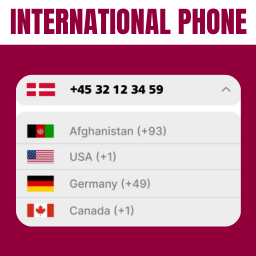
International telephone entry
Telephone field for Elementor Forms Pro adds a country selector with national flags and selectable calling codes to Elementor Forms. Visitors select a country before entering a number, and the selected country name can be added automatically to Elementor Forms’ standard drop-down field. The field suits contact, enquiry, registration, booking, and other forms that may receive numbers from various countries. It is designed for modern browsers and touch-based devices.
Country choices and defaults
Filter the countries available in the selector to match your audience or service area, and place preferred countries at the top of the list. Country Search helps visitors find a country by name when the list is long.
The Pro version can detect a default country from the visitor’s location. You can also set a default country manually when a fixed starting selection suits the form.
Validation and phone metadata
Phone number validation checks submitted numbers to help reduce invalid entries, throwaway numbers, and typing errors. The field can capture available phone metadata, such as phone type, location, and carrier. Captured metadata can also be used when setting up conditional form behavior.
Setup and mobile popups
Install the paid plugin in your WordPress dashboard, activate it, and add its telephone field to an Elementor Form. Configure the country list, validation, search, filtering, and metadata in the form setup. If a popup on mobile closes after a visitor selects a country, the supplied documentation notes that you may need to enable Prevent Closing on Overlay.
The product information lists a 30-day money-back guarantee and one year of support for the Pro version.