WordPress plugin
Sticky Chat Widget Pro
Sticky Chat Widget Pro puts configured contact options in a floating widget on a WordPress site. Visitors can select a route that suits them, such as messaging, email, SMS, a phone call, a contact form, or a link to a location or another page. The widget brings those choices together while letting site owners select the channels they use.
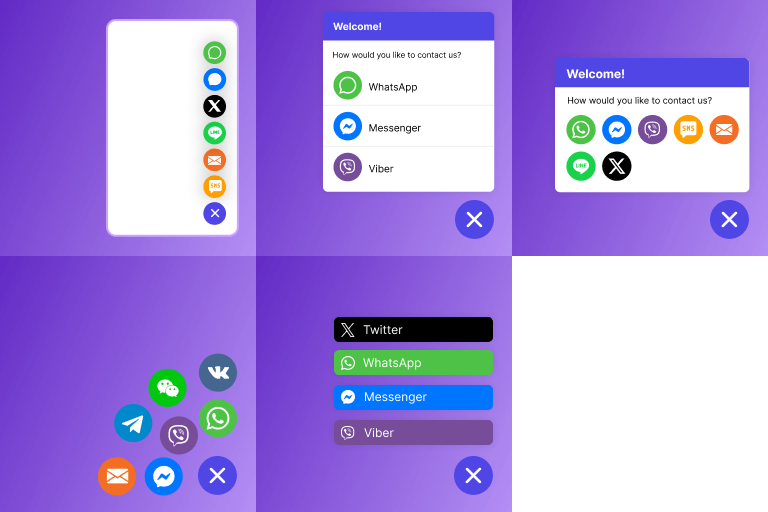
Sticky Chat Widget Pro puts configured contact options in a floating widget on a WordPress site. Visitors can select a route that suits them, such as messaging, email, SMS, a phone call, a contact form, or a link to a location or another page. The widget brings those choices together while letting site owners select the channels they use.
Choose contact channels
Supported options include WhatsApp, Facebook Messenger, Viber, Line, Email, Telegram, VKontakte, SMS, Phone Call, WeChat, Skype, Snapchat, LinkedIn, Twitter, Slack, Instagram, Waze, Google Maps, Signal, TikTok, Contact Form, Discord, Microsoft Teams, Zalo, and custom links. Waze and Google Maps can direct users to a location, while custom links can point to selected pages or resources.
The free features include unlimited channel buttons, a contact form, a dedicated WhatsApp widget, custom links, and a pending message badge. You can set colors, fonts, icons, size, and position; arrange channels vertically or horizontally; and choose separately whether channels appear on desktop or mobile. Display triggers can display the widget on scroll, after a delay, or when a visitor tries to exit.
Pro controls for timing and targeting
Pro includes the free features, then adds options for when and where the widget appears. Set days and times for channel visibility, schedule dates for a campaign or event, target selected pages, or use country targeting. Custom icons and images let you tailor the widget's visuals, while precise positioning and custom IDs or classes give developers more control over placement and CSS styling.
Pro also adds Google Analytics integration for widget usage, custom contact form fields such as text, dropdowns, and file uploads, email forwarding for form submissions, and autoresponders. Lead integrations can sync submissions with Mailchimp, Mailjet, and other email marketing tools.
Set up the widget
Install and activate the plugin, then open Sticky Chat Widget and choose Add new in the WordPress admin panel. Select at least one channel, adjust the widget's appearance and display settings, and save your changes. Pro visitors can also configure schedules, targeting, custom assets, and styling controls. Review the widget on desktop and mobile to confirm that the chosen options appear as intended.