WordPress plugin
Smart Variation Swatches for WooCommerce Pro: Swatch controls
Smart Variation Swatches for WooCommerce Pro replaces standard attribute dropdowns on variable products with selectable colors, images, and text labels. Pro adds Radio and Checkbox controls, expanded archive options, enhanced filtering, and options for products with one or several attributes.
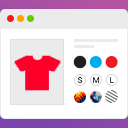
Smart Variation Swatches for WooCommerce Pro replaces standard attribute dropdowns on variable products with selectable colors, images, and text labels. Pro adds Radio and Checkbox controls, expanded archive options, enhanced filtering, and options for products with one or several attributes.
How the attribute types work
Global WooCommerce attributes determine how their terms appear. Color terms can display as circles or squares using hex colors. Image terms display uploaded thumbnails for patterns, fabrics, finishes, or styles. Button/Label terms use text for choices such as sizes, materials, or pack types. Select keeps the native dropdown, while Pro's Radio and Checkbox types provide form-style choices when swatches are not suitable.
Pro controls and product setups
- Archive settings: Control where and how swatches appear on shop and category pages.
- Enhanced filter widget: Let visitors filter by color, picture, and other attributes through a richer swatch interface in sidebars and widget areas.
- Attribute flexibility: Configure products with a single attribute or combine attributes with Pro-level overrides.
- Priority support: Receive faster help when assistance is needed.
For example, an apparel catalog can pair color swatches with size labels, while home and décor products can use image terms for patterns or finishes. Style settings include shape, size, spacing, borders, button colors, tooltips, out-of-stock display, and the option to hide the original dropdown.
Installation and setup
- Install and activate Smart Variation Swatches for WooCommerce Pro, then open Variation Swatches → Dashboard.
- Go to Products → Attributes and choose a type such as Color, Image, Button/Label, Radio, or Checkbox.
- Configure the attribute terms, assign colors or upload images where applicable, then add the attribute to variable products and create their variations.
- Open Variation Swatches → Settings to adjust styles and tooltips.
The add-on works with most WooCommerce-ready themes. Highly customized variation templates may need light CSS or template adjustments to match the theme.